


NMEA weather station meassuring and IOLITE 8xACC issues

Hello,
I have 2 problems, first I have a Vaisala WTX 536 weather station which supports the NMEA protocol. During some test I have seen that whenever I initiate measurement sometimes the output of the weather station is nonexistent as if the station wasn't conected so the system is recording empty data. what could be the issue in this case the configuration of the system or the plug-in?.
The other problem is releated to the IOLITE 8xACC, in which i getthis error and the light for that channel BNC is red what does this mean I cant find a manual with this explanation.
Thanks
Attached files:
Customer Support Engineer

Luis,
Thank you for reporting this to us.
When the "weather station is nonexistent", what do you do to recognize it and start the acquisition?
Do you have any particular use case when it is not recognized?
Personally I recommend that you always use that "Load special" function for loading setup files, which will set appropriate configuration device settings from the Setup file.
Regarding the "Excitation overload" detection I would like to know whether the issue appears as well if all the sensors are disconnected from the device before you load the setup file?
Best regards
Hello,
To answer the first question, when the i dont recieve data form the weather station what i do is to stop the measurement and start again most of the time it works some time it takes more than one reset but in the end it works. Regarding if i have a particular case when it is not recognizes, i dont it happens from time to time when starting the recording.
About the Excitation overload issue, the problem seems to be the cable as using other cable doesnt give any trouble. I still woud like to know what the red rign around the bnc connector is and what ID=B-5 means specifically.
About the load special function, is there a sequencer block that can do tha same?.
Thanks
Customer Support Engineer
Hi,
NMEA GNSS communication for weather station probably runs over COM port, right?
Is it possible to send me a screenshot of the device settings, as the image below?
Can you maybe change the synchronization to be IRIG-B DC?

The excitation overload colors for IEPE mode are below (when you connect sensor to the BNC connector)
- LED Off when no sensor is connected or sensor cable break occurs. Bias voltage >19V
- LED Green when bias voltage within limits.
- LED Red when sensor short detected, bias voltage <4V.
- LED Orange when the FW of the module is updating.
For sequencer you do not have an exact block for "Load special", but you can assure that always the same project is loaded to first use "Load project" action block and then "Load setup" block. The effect will be the same. If you need a definition what is project/what is setup you can find it here: https://training.dewesoft.com/online/course/how-to-set-up-dewesoft-x#what-is-a-project-file-and-what-is-a-setup-file

To comunicate to the vaisala WTX536 station we used the NMEA weather station plug-in, the configuration settings are below.
 Beside that, i will look into if changing the sequencer will work to avoid the weather station problem .
Thanks
Customer Support Engineer
Luis,
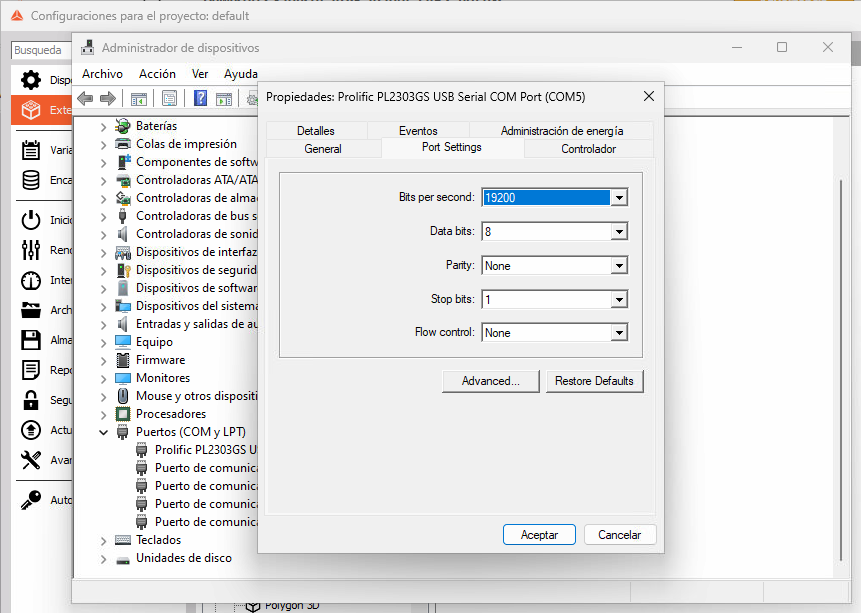
Thank you for that information. It makes sense now. On top of this definition in the Settings please check also those in Device manager
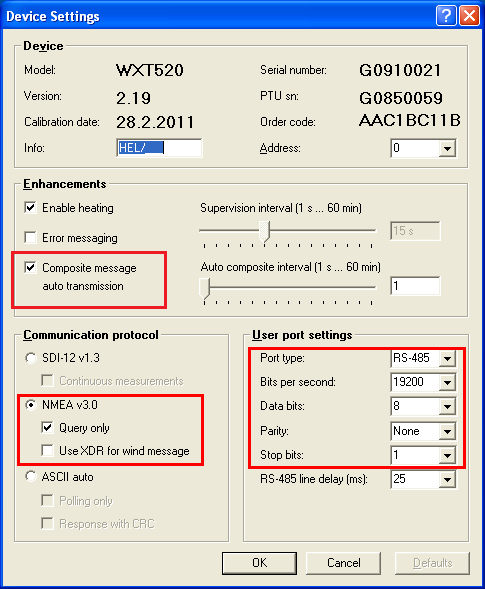
And the settings in Vaisala software.
Hello,
Those are the same settings i have for both the weather station nd the port although the port type is RS-232 I am not sure if that might be the issue.
Thanks
Customer Support Engineer
The port type should be as written on the image RS485. Please change it and let me know.
It seem that the problem has been solved.
Thank you very much
Customer Support Engineer
Customer Support Engineer