


Default Analog input settings

Is it possible to set default analog input settings for each type of module (LV, RTD, Thermocouple, STG, etc)?
For example, if a new IOLite-RTD module is connected, I'd like to have the channel settings default to:
Physical quantity: Temperature
Unit: deg F
Connection type: 3 wire
Sample rate: 10 Hz
Min: 50
Max: 300
Set to Used & Stored
Thanks
Matt
Customer Support Engineer

Dear Matt,
When the settings are done on all amplifiers you can execute "Set power on default".
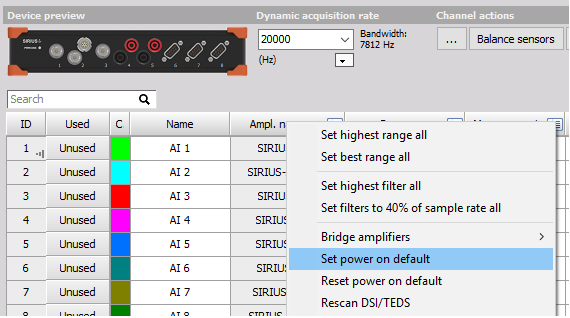
Then unplug the DAQ unit from the Ethernet and power supply. When the DAQ is connected back to power supply, it will start and remember the defined channel settings.
The channel settings can be reverted to default by selecting the "Reset power on default".
The "Set power on default" feature that Matic Pevec mentioned is exactly what you need. Once you set up one of each module type (LV, RTD, STG, etc.) exactly how you want it (deg F, 3-wire, 10Hz, etc.), hitting that button will save those settings. Then, any time that DAQ unit powers up, it uses those settings as the starting point.